USBPcap and WiFiSPC are associated with very different areas of networking and connectivity. USBPcap is a Windows-focused packet-capture tool designed to capture USB traffic, while WiFiSPC is a Wi-Fi connectivity platform focused on helping users locate available wireless hotspots. Because their purposes are different, comparing them is most useful when looking at their functionality, requirements, performance, compatibility, and intended use cases.
USBPcap vs WiFiSPC at a Glance
| Category | USBPcap | WiFiSPC |
| Primary purpose | USB packet capture and traffic analysis | Finding and accessing available Wi-Fi hotspots |
| Main environment | Windows computers | Web and mobile environments |
| Network analysis | USB traffic capture | Not primarily a packet-analysis tool |
| Wi-Fi hotspot discovery | No | Yes |
| Packet capture | Yes, for USB traffic | No |
| PCAP output | Supported | Not its primary function |
| Hardware dependence | USB devices and Windows system | Mobile device/location and internet access |
| Typical users | Developers, power users, troubleshooting and analysis users | Travelers, remote workers, and general internet users |
| Main focus | Technical traffic inspection | Wireless connectivity discovery |
| Learning curve | Higher for technical packet analysis | Generally simpler for hotspot discovery |
What Is USBPcap?
USBPcap is an open-source USB packet-capture project for Windows. It includes a capture driver and a command-line capture component that can record USB traffic for analysis. The project is commonly used alongside packet-analysis workflows, including Wireshark-based analysis.
Its purpose is technical rather than consumer-oriented. Instead of helping users find an internet connection, USBPcap provides visibility into communications between USB devices and the host system.
Key Features
- USB traffic capture
- Windows-oriented packet-capture functionality
- Capture-driver architecture
- PCAP output for analysis
- Command-line capture component
- Integration with packet-analysis workflows
- Support for investigating USB communication problems
USBPcap’s published project information also lists separate USBPcapDriver and USBPcapCMD components, reflecting its driver and user-space capture architecture.
Advantages
- Specifically designed for USB traffic capture
- Useful for technical troubleshooting and analysis
- Can produce packet captures for further examination
- Open-source components
- Designed for Windows environments
Limitations
- Focused on USB traffic rather than general network monitoring
- Primarily suited to technical and power-user workflows
- Requires appropriate Windows and driver configuration
- It does not function as a Wi-Fi hotspot-finding service
What Is WiFiSPC?
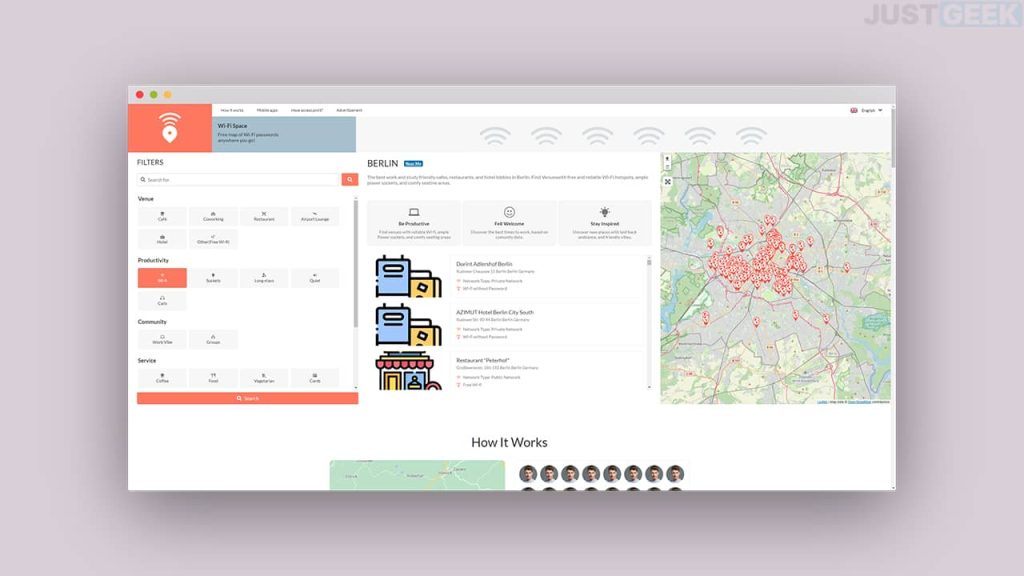
WiFiSPC is a Wi-Fi connectivity platform designed around discovering available wireless hotspots. Its service describes itself as a community-powered Wi-Fi database covering hotspots across numerous countries and providing access through web and mobile experiences.
Its focus is therefore much closer to Wi-Fi discovery and connectivity than packet capture or low-level traffic analysis.
Key Features
- Wi-Fi hotspot discovery
- Interactive hotspot mapping
- Location-based searching
- Community-contributed hotspot information
- Mobile applications
- Web-based access
- Hotspot information covering multiple countries
- Search by location and venue
The platform states that its database combines user contributions, verification, and automated validation processes.
Advantages
- Designed for finding Wi-Fi access points
- Useful for travelers and users looking for connectivity
- Available through web and mobile environments
- Community-based hotspot information
- Location-oriented interface
Limitations
- Not a USB packet-capture tool
- Not designed for detailed protocol-level traffic analysis
- Availability and usefulness can vary by location
- Hotspot information can change as networks become unavailable or access details are updated
- Requires users to consider the security of public Wi-Fi networks
Features Comparison
The fundamental distinction between the two tools is their objective.
USBPcap focuses on capturing USB communications for technical analysis, while WiFiSPC focuses on discovering Wi-Fi connectivity options.
USBPcap can be relevant when a developer or technician needs to inspect USB device communication. WiFiSPC is more relevant when a person needs to identify available Wi-Fi hotspots in a particular area.
Neither tool is designed to replace the other because they operate in different categories.
Performance Comparison
Performance should be evaluated according to the task being performed.
USBPcap operates at a relatively technical level and captures USB traffic generated by connected devices. The amount of traffic, number of USB devices, capture duration, storage speed, and subsequent analysis can affect system workload and capture-file size.
WiFiSPC’s performance is more dependent on the quality of its web or mobile interface, available location data, internet connectivity, device capabilities, and the density of hotspot information in a particular area.
Factors Affecting USBPcap Performance
- Number of connected USB devices
- Amount of USB traffic
- Capture duration
- Storage performance
- Packet-analysis workload
- Windows configuration
Factors Affecting WiFiSPC Performance
- Internet connection
- GPS/location availability
- Mobile-device performance
- Local hotspot coverage
- Database availability
- Accuracy and freshness of hotspot information
Because the applications perform fundamentally different jobs, a direct speed comparison would not provide a meaningful overall result.
Compatibility
Compatibility is another major difference.
USBPcap is designed around Windows and USB hardware. Its project documentation includes Windows-specific driver and build information, including different Windows versions and architectures.
WiFiSPC is designed as a web and mobile-oriented service. Its platform describes availability through a website and mobile applications for iOS and Android.
| Compatibility Area | USBPcap | WiFiSPC |
| Windows | Yes | Through web access |
| macOS | Not its primary supported environment | Through web access |
| Linux | Not its primary supported environment | Through web access |
| Android | No | Yes |
| iOS | No | Yes |
| USB hardware | Required for USB capture | Not central to the service |
| GPS/location | Not required | Useful for nearby hotspot discovery |
System Requirements
USBPcap requires a compatible Windows environment and appropriate driver configuration. Because it works at the USB-capture level, its requirements are more closely tied to the Windows operating system, USB hardware, and driver environment.
WiFiSPC generally has fewer technical requirements for basic use because it can be accessed through web and mobile platforms. Location features may require location services on supported devices.
USBPcap Requirements
- Compatible Windows computer
- USB devices or interfaces to capture
- Appropriate USBPcap driver
- Sufficient storage for packet captures
- Administrative access may be needed for certain installation/configuration tasks
WiFiSPC Requirements
- Compatible web browser or supported mobile device
- Internet connection
- Location access for nearby hotspot discovery where applicable
- Supported mobile operating system for app-based use
Use Cases
USBPcap Is More Relevant For
- USB device troubleshooting
- Inspecting USB communications
- Developer testing
- Technical diagnostics
- Packet-capture research
- Investigating USB-related problems
- Creating captures for later packet analysis
WiFiSPC Is More Relevant For
- Finding nearby Wi-Fi hotspots
- Travel connectivity
- Locating public wireless access
- Searching Wi-Fi availability by location
- Identifying connectivity options in unfamiliar areas
- Browsing community-provided hotspot information
Ease of Use
USBPcap has a more technical learning curve because packet capture involves concepts such as USB transfers, endpoints, devices, interfaces, and packet-analysis software. Users who are unfamiliar with network or USB diagnostics may need additional technical knowledge.
WiFiSPC is designed around a more straightforward discovery experience. Users can search for locations and browse available hotspot information without needing to understand packet-capture concepts.
The difference reflects their intended audiences rather than an inherent quality difference.
Security and Privacy Considerations
The two tools also involve different security considerations.
With USBPcap, captured USB traffic can contain sensitive information depending on the device and data being transmitted. Packet captures should therefore be stored securely and handled only when the user has appropriate authorization to inspect the traffic.
With WiFiSPC, users should remember that public or shared Wi-Fi networks can present privacy and security risks. A hotspot being listed or accessible does not automatically mean that the connection is trustworthy.
WiFiSPC’s own published material states that its service uses location information for relevant hotspot functionality and describes its privacy practices separately.
Pros and Cons
USBPcap
Pros
- Specialized USB packet capture
- Useful for technical diagnostics
- Windows-focused implementation
- Supports PCAP-based analysis
- Open-source project components
Cons
- Requires technical knowledge
- Windows-focused
- Not intended for Wi-Fi hotspot discovery
- Driver configuration can add complexity
- Packet captures may become large during extended monitoring
WiFiSPC
Pros
- Focused on Wi-Fi hotspot discovery
- Web and mobile accessibility
- Location-based searching
- Community-driven hotspot information
- Useful for travel and connectivity planning
Cons
- Not a packet-analysis application
- Does not provide USB traffic capture
- Coverage can vary by location
- Hotspot availability can change
- Public Wi-Fi still requires normal security precautions
USBPcap vs WiFiSPC: Different Tools for Different Tasks
USBPcap and WiFiSPC should primarily be viewed as tools serving separate purposes.
USBPcap belongs to the technical packet-capture and USB diagnostics category. It can be useful when examining communications between USB hardware and a Windows computer.
WiFiSPC belongs to the Wi-Fi discovery and connectivity category. It is intended to help users locate available wireless hotspots and related access information.
The appropriate choice therefore depends on whether the task involves analyzing USB communication or finding Wi-Fi connectivity.
Conclusion
USBPcap and WiFiSPC differ substantially in functionality, target users, requirements, and operating environments. USBPcap focuses on USB packet capture and technical analysis on Windows, while WiFiSPC focuses on locating Wi-Fi hotspots through web and mobile-oriented services.
Their performance is influenced by different factors, and their compatibility requirements reflect their distinct purposes. USBPcap is closely tied to USB hardware and Windows drivers, whereas WiFiSPC relies more on location services, internet connectivity, and available hotspot data.